Android Studio is Google’s official IDE for Android app development, trusted by millions of developers worldwide. It offers smart code editing, AI-powered assistance with Gemini, and versatile tools for phones, tablets, wearables, and more. Ideal for beginners, students, and professional developers alike, it’s free, open-source, and compatible across Windows, Mac, Linux, and ChromeOS.
If you’re planning to dive into Android development, the first question that comes up is—why Android Studio? The answer is simple: it’s the official IDE from Google, built specifically to handle everything related to Android apps. From designing layouts to debugging across devices, Android Studio offers a complete toolkit in one place.
For me, this wasn’t just theory. I’ve personally worked with Android Studio for over 1.5 years as a developer, and along with my team, we tested its tools across different devices, operating systems, and even in cloud-based setups. This gave us a deep, practical understanding of how it performs in real-world development.
On top of that, Android Studio isn’t just “another IDE.” It carries the weight of being Google’s official development environment, which means faster updates, the latest SDK support, and long-term trust. Simply put, if you’re serious about building Android apps, this is the environment you need to master.
Basic Overview
Android Studio is a dedicated integrated development environment (IDE) for developing Android applications. It offers Android-specific tools like an emulator, layout designer, APK analyzer, and now AI-powered coding assistance through Gemini, which helps generate, suggest, and debug code efficiently. Whether you’re creating small learning projects or large enterprise apps, it supports all stages—coding, testing, and deployment.
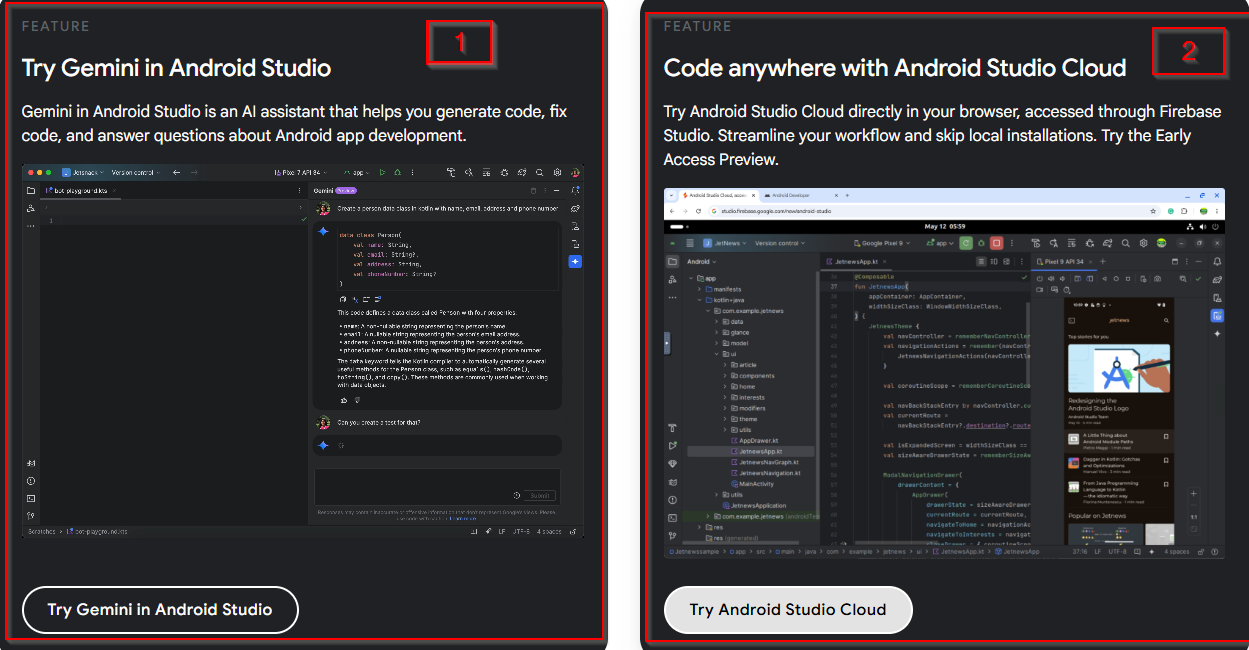
One of the newest and most exciting updates is cloud-based development, which allows developers to run emulator sessions and builds remotely. This reduces pressure on local machines and makes testing across multiple devices much faster, especially for teams collaborating in real time.
Backed directly by Google, Android Studio ensures seamless compatibility with the latest Android versions, frameworks, and SDKs. Combined with Gemini AI and cloud integration, it’s the most reliable and modern IDE for Android developers today.
What Android Studio Promises
Android Studio promises to be the one-stop shop for Android app development. It offers speed, flexibility, and powerful tools designed to help developers bring their ideas to life faster. From their official website, we get these:
Cross-device support: Phones, wearables, TV, tablets, and automotive.
Smart code editing: Code completion for Java, Kotlin, and C/C++.
AI-powered Gemini assistant: Suggests, generates, and fixes code.
Fast build system: Flexible Gradle-based builds.
Testing & debugging: Robust Android Emulator for all device types.
Testing Android Studio Ourselves
We believe reviews should be based on real usage, not theory. That’s why we ran Android Studio through a full test cycle. We created apps, tested builds, debugged with the emulator, and even used the cloud development feature to see how it handles large-scale workflows.
Our team worked across Windows, macOS, Linux, and ChromeOS, ensuring that we covered the full range of supported platforms. Every tool—from Gemini to APK Analyzer—was tested in both small and large projects.
Why trust us? Because these aren’t surface-level claims. We lived through the pain of Gradle sync delays, the joy of instant Live Edit updates, and the efficiency boost of AI assistance. What you read here reflects genuine developer experience, not just what’s written in official documentation.
Ease of Use
Installing Android Studio is relatively straightforward on Windows, macOS, Linux, and ChromeOS. The guided setup takes you through SDK installation, emulator configuration, and IDE settings. For cloud-based development, we found the setup surprisingly smooth, allowing remote builds with minimal effort.
The user interface can be intimidating at first, especially for beginners. Multiple panels, windows, and settings might feel overwhelming. But with time, everything starts to make sense. The intelligent editor, clear previews, and easy navigation make the experience more manageable.
For beginners, the learning curve is steep but rewarding—Gemini AI really helps shorten the gap. For experienced developers, Android Studio feels like an advanced toolbox where everything is customizable and fine-tuned for Android.
Quality & Performance
In terms of build speed, Android Studio has definitely improved, but large projects can still suffer from long Gradle sync times. Smaller projects build quickly, especially with incremental builds enabled.
The emulator is one of the most powerful tools in the package. It allows testing across multiple Android versions, devices, and configurations. However, it consumes a lot of resources, so smooth performance often requires a strong machine.
For stability, Android Studio works reliably in most cases, even with heavy projects. Occasionally, the IDE freezes, especially when running multiple plugins, but it recovers well.
The cloud integration is a standout feature—running emulator sessions remotely saves time and reduces strain on local machines. Combined with Gemini AI, which makes real-time code suggestions, Android Studio now feels more intelligent and collaborative than ever.
Below, we’ve highlighted the features that truly stood out during our testing—the ones we loved using the most, as well as the areas where we felt there’s still room for improvement.
Features That Stood Out
Gemini AI Felt Like a True Coding Partner
When we tested Gemini inside Android Studio, it honestly felt less like a tool and more like a teammate. Instead of constantly alt-tabbing to Stack Overflow or docs, Gemini stepped in with quick fixes, smart refactors, and context-aware suggestions. It didn’t just autocomplete—it actually understood what we were building. For us, that meant fewer interruptions and a smoother flow.
Live Edit Changed the Game
Normally, tweaking an XML layout or Compose code means waiting for a full rebuild to see results. But with Live Edit, we saw changes instantly reflected on the emulator. It felt more like designing in Figma than coding in an IDE. This made testing UI variations on phones and tablets ridiculously faster.
Compose Design Tools Made UI Building Fun Again
We played around with wearable and foldable previews using Compose Design Tools, and it was surprisingly accurate. Switching between code and design preview was seamless, and dragging components onto the canvas didn’t feel clunky at all. For once, designing UI in Android Studio didn’t feel like a chore.
Emulator Performance Surprised Us
In earlier versions, running two emulators at once was enough to make a laptop crawl. This time, we ran a Pixel 7 and an Android TV emulator side by side, and it held up far better than expected. Animations were smoother, app launches faster, and we didn’t feel the urge to quit everything else running on our system.
Gradle Managed Dependencies Better
One of the biggest pain points used to be dependency conflicts. During our test builds, Gradle gave clearer error messages and handled mismatches more gracefully. It’s not perfect, but debugging build errors felt less like detective work this time.
Cloud Deployment Felt Effortless
We tested the cloud build and deploy features, and pushing a project to the cloud was way easier than setting up a local environment for everything. It gave us quick results and let us share test builds with teammates instantly. For collaborative projects, this is a huge plus.
Features That Still Need Improvement
Android Studio Is Still Resource-Hungry
Even though performance is better, Android Studio still eats up RAM and CPU like it’s free. On a high-end machine, it wasn’t an issue, but when we tried on a mid-range laptop, the IDE and emulator together slowed everything down. Developers with less powerful setups will still feel this pain.
Gradle Builds Remain Too Slow
Yes, builds are faster than before, but we still caught ourselves waiting. Long builds break the rhythm, especially when testing frequent changes. Cached builds helped, but not enough to call it “fast.” This is one area where Android Studio still trails behind lighter IDEs.
Cloud Tools Need More Depth
Deploying to the cloud was smooth, but the feature set feels shallow. We couldn’t do advanced debugging or detailed performance tracking in the cloud the way we can locally. It works great for quick testing, but professional teams might find it lacking for deeper workflows.
Gemini Sometimes Misses the Point
While Gemini AI impressed us most of the time, there were moments it gave too much explanation or generic solutions. For example, when testing Kotlin coroutines, Gemini offered suggestions that solved nothing new. It’s useful, but it still needs fine-tuning to avoid being distracting.
Emulator Still Has Odd Glitches
Despite improved performance, we noticed occasional quirks. At times, the emulator screen froze for a few seconds or touch gestures lagged. It wasn’t a deal-breaker, but it reminded us that real device testing is still irreplaceable.
Plugin Compatibility Can Be Hit or Miss
We rely on third-party plugins for some workflows, and during testing, a couple of them didn’t play well with the latest version of Android Studio. Updating plugins sometimes solved it, but it’s frustrating when your workflow depends on one that isn’t stable yet.
Who Should Use It
Beginners learning Android development with Gemini’s help.
Students building apps or academic projects.
Professional developers working on real-world production apps.
Teams collaborating across devices or using cloud integration.
Comparison With Other IDEs
Compared to IntelliJ IDEA, Android Studio shares the same core but is tuned specifically for Android development. It comes with built-in SDK tools, templates, and emulators—things IntelliJ requires extra setup for.
Against Eclipse, Android Studio feels far more modern and polished. Eclipse needs a lot of plugins to support Android development, while Studio works out of the box. Eclipse also struggles with newer features like Compose, where Studio shines.
When compared to Visual Studio, Android Studio clearly dominates for Android. Visual Studio is excellent for cross-platform and .NET, but its Android integration (via Xamarin or MAUI) doesn’t match the depth of Studio’s native support.
In short, while alternatives exist, Android Studio remains the go-to IDE because of its tight Google integration, AI assistance, and Android-first design.
Our Final Thought (Fileion’s Angle)
After working with Android Studio, I can confidently say it’s the best environment for Android development today. It has its flaws—mainly Gradle delays and resource-heavy emulators—but nothing else matches its power, reliability, and constant updates from Google.
At Fileion, we recommend Android Studio not just because it’s official, but because we’ve tested it ourselves across devices and in the cloud. If you’re serious about Android development, this is the IDE you need.
Hi, I’m Ishrat, Junior Content Writer at Fileion. With a strong passion for tech and a background i...
1
Followers
0
Following
Software Content Writer
Hi, I’m Ishrat, Junior Content Writer at Fileion. With a strong passion for tech and a background in SEO, digital content, and web solutions, I craft stories that connect users to the tools they need. At Fileion, I turn complex topics into clear, helpful content, making tech feel simple and accessible for everyone. Let’s write something impactful!
FAQs
Frequently Asked Questions
Yes. It’s the industry-standard IDE for Android, used by both beginners and top app companies.
No. You need at least basic programming knowledge in Java or Kotlin to build Android apps.
Click “Start the Download” on Fileion to get the installer, run it, and follow the setup wizard.
Build a professional, modern, responsive Gaming Rewards Platform with both a web application and mobile-friendly interface.
IMPORTANT:
This platform must NOT provide gambling, sports betting, casino wagering, odds-based betting, or real-money wagering. Users should earn rewards through legitimate skill-based gameplay, competitions, achievements, and promotional activities.
1. BRAND & DESIGN
Create a premium gaming interface inspired by modern esports and gaming platforms, but do not copy any existing company's logo, branding, UI, or copyrighted assets.
Design:
- Dark modern gaming theme
- Professional dashboard
- Smooth animations
- Mobile-first responsive design
- Clean cards and navigation
- High-quality game thumbnails
- Clear reward/points indicators
- Fast-loading interface
- Accessible typography
- Responsive on Android, iOS, tablet, and desktop
Use a unique brand name: "GAMEWINX"
Create an original logo concept using the letters "GWX".
2. HOME PAGE
Create:
- Header
- Logo
- Login button
- Register button
- User profile menu
- Featured games
- Popular games
- Daily challenges
- Weekly tournaments
- Leaderboard
- Reward announcements
- How it works
- FAQ
- Responsible gaming section
- Terms & Conditions
- Privacy Policy
- Contact page
Hero section:
"PLAY. COMPETE. EARN REWARDS."
Subtext:
"Challenge your skills, climb the leaderboard, and earn rewards."
Buttons:
- PLAY NOW
- VIEW TOURNAMENTS
3. USER REGISTRATION
Create secure registration:
Fields:
- Full Name
- Username
- Email
- Phone Number
- Password
- Confirm Password
- Profile picture
- Username
- Total points
- Current rank
- Games played
- Games won
- Tournament participation
- Achievement badges
- Reward history
- Notification center
Dashboard cards:
TOTAL POINTS
CURRENT RANK
GAMES PLAYED
ACHIEVEMENTS
5. GAME SECTION
Create a game library.
Categories:
- Arcade
- Puzzle
- Racing
- Strategy
- Quiz
- Sports Skills
- Reaction Games
- Multiplayer Skill Games
Each game card should display:
- Game thumbnail
- Game name
- Difficulty
- Best score
- Play button
- Leaderboard button
Games should reward users based on measurable skill/performance rather than chance.
6. TOURNAMENT SYSTEM
Create skill-based tournaments.
Tournament information:
- Tournament name
- Start time
- End time
- Number of players
- Entry requirement, if any
- Prize/reward pool
- Rules
- Leaderboard
Example:
"Daily Speed Challenge"
Players compete for the highest score.
Rewards can be:
1st Place — 10,000 points
2nd Place — 5,000 points
3rd Place — 2,500 points
If monetary rewards are eventually introduced, design the system only after reviewing the applicable laws, age restrictions, taxation, KYC/AML requirements, payment-provider rules, and platform policies for every supported country.
- Loading states
- Empty states
- Error states
- Success messages
- Confirmation dialogs
- Mobile responsive layouts
21. PERFORMANCE
Optimize for:
- Fast initial load
- Image optimization
- Lazy loading
- API caching
- Database indexing
- Pagination
- Efficient queries
- Mobile performance
22. FINAL REQUIREMENT
Generate the project as a complete, modular, production-ready application.
First create the project architecture and database schema.
Then create authentication.
Then create the main dashboard.
Then implement games.
Then tournaments and leaderboards.
Then rewards.
Then referrals.
Then notifications.
Then admin panel.
Then security and validation.
Finally provide instructions for:
1. Installing dependencies
2. Setting environment variables
3. Creating the database
4. Running the development server
5. Testing the application
6. Building for production
7. Deploying the website
8. Packaging the Android application
Use clean, maintainable code and explain where each file belongs.
Do not use copyrighted 1xBet assets, branding, logos, or proprietary code. Create an original visual identity for GAMEWINX.




NANA DANA
IMPORTANT:
This platform must NOT provide gambling, sports betting, casino wagering, odds-based betting, or real-money wagering. Users should earn rewards through legitimate skill-based gameplay, competitions, achievements, and promotional activities.
1. BRAND & DESIGN
Create a premium gaming interface inspired by modern esports and gaming platforms, but do not copy any existing company's logo, branding, UI, or copyrighted assets.
Design:
- Dark modern gaming theme
- Professional dashboard
- Smooth animations
- Mobile-first responsive design
- Clean cards and navigation
- High-quality game thumbnails
- Clear reward/points indicators
- Fast-loading interface
- Accessible typography
- Responsive on Android, iOS, tablet, and desktop
Use a unique brand name: "GAMEWINX"
Create an original logo concept using the letters "GWX".
2. HOME PAGE
Create:
- Header
- Logo
- Login button
- Register button
- User profile menu
- Featured games
- Popular games
- Daily challenges
- Weekly tournaments
- Leaderboard
- Reward announcements
- How it works
- FAQ
- Responsible gaming section
- Terms & Conditions
- Privacy Policy
- Contact page
Hero section:
"PLAY. COMPETE. EARN REWARDS."
Subtext:
"Challenge your skills, climb the leaderboard, and earn rewards."
Buttons:
- PLAY NOW
- VIEW TOURNAMENTS
3. USER REGISTRATION
Create secure registration:
Fields:
- Full Name
- Username
- Email
- Phone Number
- Password
- Confirm Password
Features:
- Email verification
- Secure password hashing
- Login
- Logout
- Forgot password
- Password reset
- Account verification
- Session management
Do not store passwords in plain text.
4. USER DASHBOARD
After login, show:
- Profile picture
- Username
- Total points
- Current rank
- Games played
- Games won
- Tournament participation
- Achievement badges
- Reward history
- Notification center
Dashboard cards:
TOTAL POINTS
CURRENT RANK
GAMES PLAYED
ACHIEVEMENTS
5. GAME SECTION
Create a game library.
Categories:
- Arcade
- Puzzle
- Racing
- Strategy
- Quiz
- Sports Skills
- Reaction Games
- Multiplayer Skill Games
Each game card should display:
- Game thumbnail
- Game name
- Difficulty
- Best score
- Play button
- Leaderboard button
Games should reward users based on measurable skill/performance rather than chance.
6. TOURNAMENT SYSTEM
Create skill-based tournaments.
Tournament information:
- Tournament name
- Start time
- End time
- Number of players
- Entry requirement, if any
- Prize/reward pool
- Rules
- Leaderboard
Example:
"Daily Speed Challenge"
Players compete for the highest score.
Rewards can be:
1st Place — 10,000 points
2nd Place — 5,000 points
3rd Place — 2,500 points
Use points/rewards rather than gambling payouts.
7. LEADERBOARD
Create:
- Global leaderboard
- Daily leaderboard
- Weekly leaderboard
- Monthly leaderboard
- Friends leaderboard
Display:
Rank | Username | Score | Achievement
Add pagination and search.
8. REWARD SYSTEM
Create a virtual points system.
Users can earn points through:
- Playing skill games
- Completing challenges
- Daily login
- Achievements
- Tournament performance
- Promotional events
Example:
Daily Login → +100 points
Complete Challenge → +500 points
Tournament Winner → +10,000 points
Do not create betting balances or wagering wallets.
9. REDEMPTION SYSTEM
Create a rewards redemption page.
Users can exchange eligible points for platform-approved rewards.
Show:
- Available points
- Reward catalog
- Required points
- Redeem button
- Redemption history
- Redemption status
Statuses:
Pending
Approved
Rejected
Completed
Add fraud detection and manual admin review.
10. REFERRAL SYSTEM
Create a referral program.
Each user gets a unique referral code.
Example:
GAMEWINX-USER123
Display:
- Referral link
- Total referrals
- Successful referrals
- Referral rewards
Add anti-abuse protection.
11. NOTIFICATION SYSTEM
Create notifications for:
- Tournament starting
- Tournament ending
- Achievement unlocked
- Reward approved
- New challenge
- Promotional events
- Security alerts
12. ADMIN PANEL
Create a separate secure Admin Dashboard.
Admin features:
- Dashboard statistics
- User management
- Game management
- Tournament management
- Reward management
- Challenge management
- Referral management
- Reports
- Fraud detection
- User verification
- Redemption approval
- Notifications
- Content management
- System settings
Admin statistics:
Total Users
Active Users
Games Played
Total Points Issued
Rewards Redeemed
Pending Redemptions
Fraud Alerts
13. SECURITY
Implement:
- HTTPS
- Secure authentication
- Password hashing
- JWT/session security
- Rate limiting
- Input validation
- SQL injection protection
- XSS protection
- CSRF protection
- API authentication
- Admin role protection
- Suspicious activity detection
- Duplicate account detection
- Server-side score validation
Never trust scores or rewards submitted directly by the client.
14. DATABASE
Design a scalable database with tables/collections such as:
users
profiles
games
game_sessions
scores
tournaments
tournament_entries
leaderboards
achievements
user_achievements
points_transactions
rewards
redemptions
referrals
notifications
admin_users
fraud_events
system_settings
Create proper relationships, indexes, timestamps, and unique constraints.
15. BACKEND API
Create REST APIs for:
Authentication
Users
Games
Scores
Tournaments
Leaderboards
Achievements
Points
Rewards
Redemptions
Referrals
Notifications
Admin
Every sensitive operation must be validated on the server.
16. MOBILE APP
Create a mobile-first experience with bottom navigation:
Home
Games
Tournaments
Leaderboard
Profile
Make the UI optimized for Android phones.
Use responsive components so the same backend can serve both website and mobile application.
17. WEBSITE PAGES
Create:
/
/login
/register
/games
/game/:id
/tournaments
/tournament/:id
/leaderboard
/rewards
/profile
/achievements
/referrals
/notifications
/help
/terms
/privacy
/contact
Admin:
/admin
/admin/users
/admin/games
/admin/tournaments
/admin/rewards
/admin/redemptions
/admin/reports
/admin/settings
18. TECHNOLOGY
Use a modern production-ready architecture.
Frontend:
React / Next.js
Backend:
Node.js / Express or an equivalent secure backend.
Database:
PostgreSQL or Firebase.
Authentication:
Firebase Authentication or secure JWT-based authentication.
Storage:
Cloud storage for game images and user avatars.
Deploy the web application using a production hosting service.
Keep API keys and secrets in environment variables.
Never expose secret credentials in frontend code.
19. PAYMENT / REWARD SAFETY
Do NOT implement:
- Sports betting
- Casino
- Slot machines
- Roulette
- Betting odds
- Real-money wagering
- Deposit-to-bet
- Random gambling payouts
If monetary rewards are eventually introduced, design the system only after reviewing the applicable laws, age restrictions, taxation, KYC/AML requirements, payment-provider rules, and platform policies for every supported country.
20. UI DETAILS
Create reusable components:
Button
Card
Modal
Toast
Navbar
Sidebar
GameCard
TournamentCard
LeaderboardTable
RewardCard
ProfileCard
NotificationItem
Pagination
SearchBar
FilterMenu
Add:
- Loading states
- Empty states
- Error states
- Success messages
- Confirmation dialogs
- Mobile responsive layouts
21. PERFORMANCE
Optimize for:
- Fast initial load
- Image optimization
- Lazy loading
- API caching
- Database indexing
- Pagination
- Efficient queries
- Mobile performance
22. FINAL REQUIREMENT
Generate the project as a complete, modular, production-ready application.
First create the project architecture and database schema.
Then create authentication.
Then create the main dashboard.
Then implement games.
Then tournaments and leaderboards.
Then rewards.
Then referrals.
Then notifications.
Then admin panel.
Then security and validation.
Finally provide instructions for:
1. Installing dependencies
2. Setting environment variables
3. Creating the database
4. Running the development server
5. Testing the application
6. Building for production
7. Deploying the website
8. Packaging the Android application
Use clean, maintainable code and explain where each file belongs.
Do not use copyrighted 1xBet assets, branding, logos, or proprietary code. Create an original visual identity for GAMEWINX.